
Overview
Zift PRM is organized around three main entity types: Person, Location, and Organization (POL). These POL entities have a hierarchical relationship: each Person is associated with a Location and every Location is associated with an Organization.
POL Entities are managed through specialized Screens that are accessed through the 3-panel view. The procedure below explains how to access the entity management Screens.
Before You Begin
Log into your Zift PRM Administration site as an internal user.
How to View the POL Entity Management Screens
- Enter data that matches an entity into the search bar at the top of the screen and hit Enter.
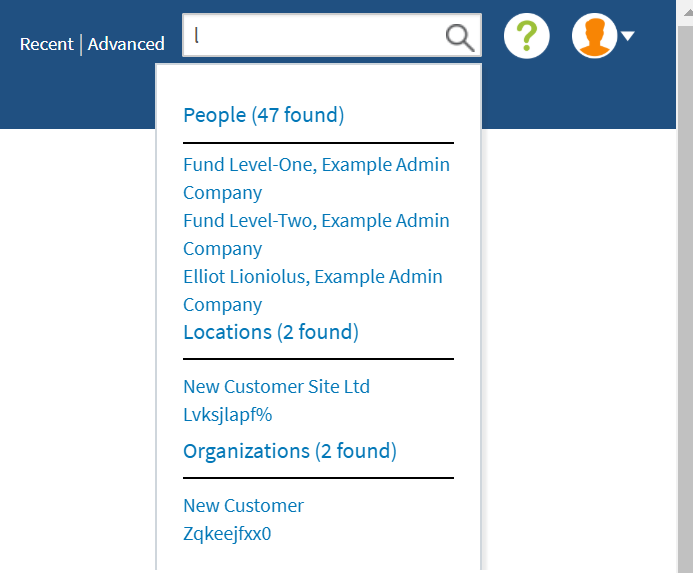 This list will include all POL Entities that match the search criteria. If too many results match the search criteria, the list will be truncated.
 - [Optional] If the Person, Location, or Organization you want has been truncated from the list, click on the appropriate header to expand the list. For example, if you click on People in the situation above, a new screen listing all 47 matching results is displayed.
- Click on the Person, Location, or Organization entity you wish to view. This will open the 3-panel view.
The 3-panel view provides access to the management screens relating to whichever Entity instance is in focus. The entity in focus is identified in the bottom panel. You can shift focus by clicking on a hyperlinked Person or Location name (upper right panel) or Organization name (upper left panel). The detail screens for the Entity are accessed by clicking More... in the lower panel.
Related Topics
- Administration: Person Management Screens
- Administration: Location Management Screens
- Administration: Organization Management Screens
Comments
0 comments
Please sign in to leave a comment.