
Overview
Relaytags are ready-made widgets located on the WYSIWYG editor of a portal page, which enables you to quickly and easily add a wide variety of functionality to the pages of your Partner Portal. Relaytags can be used to display files and media resources, link to training courses, or enable a partner to monitor the progress of their opportunities. This article describes how to use the RELAY_EVENTLIST.
Best Practice for Relaytags
While you can use more than one Relaytag on a single page, we recommend that you only do so if the Relaytags are querying different data. Interference and unexpected behavior may result if two Relaytags on a single page attempt to access the same data.
Before You Begin
- Log into PRM Admin with elementTask Level 2 rights or greater. The instructions below assume that you have previously created the page you wish to add the Relaytag to. In general, it is best practice to only display a single Relaytag per page.
- You will also need the user level permission to Add a Phrase and the appropriate language rights.
- How to Add a Relaytag to a Partner Portal Page.
Partner Portal Result
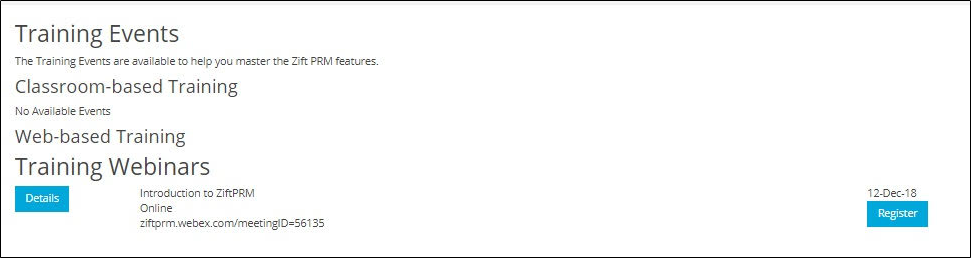
This is an example of the code used and the end result of using the tag. You can customize the results using the parameters below.
Relaytag Configuration
The RELAY_EVENTLIST Relaytag displays all valid events to a logged in user. An event must meet the following criteria to be considered valid:
- eventDetails.eventStatus = agreed
- eventCountry.countryid = user's countryID
- eventDetails.AllocatedStartDate/PreferredStartDate = in the future
- eventDetails.invitationType= open OR if eventDetails.invitationType = invOnly, the user must be in the eventFlagdata
| Parameters | Type | Description |
|---|---|---|
| EventGroupID | Integer | When set, this parameter restricts the event visibility to a single group ID. |
| moduleID | Integer | When set, this parameter restricts the event visibility to a single eLearning moduleID. |
You can add this Relaytag to a Portal page using the procedure described here.
Sample definition
{{RELAY_EVENTLIST moduleID=148 eventGroupID=14}} Related Topics
- About Events
- Create Events
- Manage Event Groups
- Create a Target List
- Create Email Marketing Communication
- Event Activity Metrics
- RELAY_EVENTLIST Relaytag
Comments
0 comments
Please sign in to leave a comment.