
Overview
Relaytags are ready-made widgets located on the WYSIWYG editor of a portal page, which enables you to quickly and easily add a wide variety of functionality to the pages of your Partner Portal. Relaytags can be used to display files and media resources, link to training courses, or enable a partner to monitor the progress of their opportunities. This article describes how to use the RELAY_LOCATOR.
Best Practice for Relaytags
While you can use more than one Relaytag on a single page, we recommend that you only do so if the Relaytags are querying different data. Interference and unexpected behavior may result if two Relaytags on a single page attempt to access the same data.
Partner Portal Result
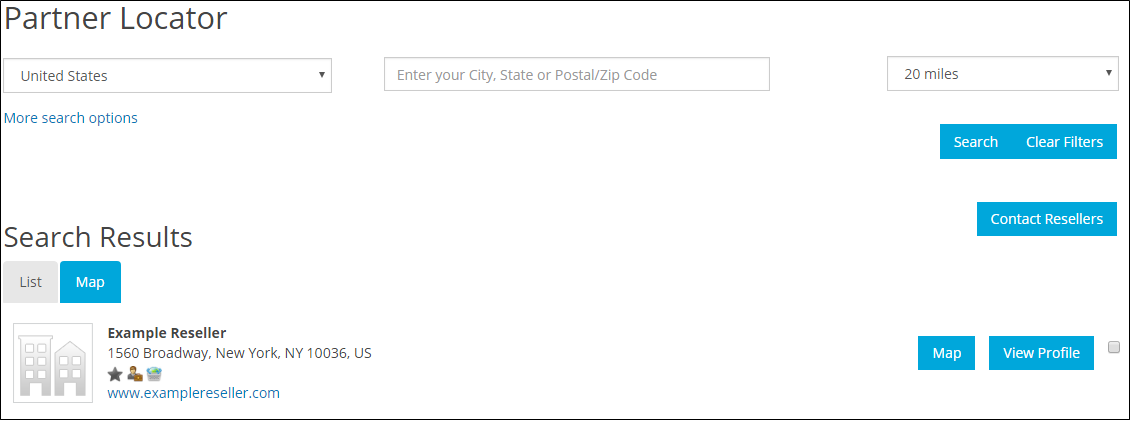
This is an example of the code used and the end result of using the tag. You can customize the results using the parameters below.
Figure: Portal page displaying RELAY_LOCATOR with the example settings.
Relaytag Configuration
The RELAY_LOCATOR Relaytag controls the behavior of the initial Partner Locator page in the Portal. The detail page for results is configured with the RELAY_SOCIALORGANIZATIONPROFILE Relaytag.
| Parameters | Type | Description |
|---|---|---|
| Hide Search Profiles by Default | Radio Button | When set to Yes the Partner Locator search will be hidden from Portal Users. |
| Radio Button | Drop-down List | Sets the initial results' display as either a list or a map. |
You can add this Relaytag to a Portal page using the procedure described here.
Sample definition
{{RELAY_LOCATOR}}
Comments
0 comments
Please sign in to leave a comment.