
Overview
Campaigns are used to group actions and activities that are taken around a specific initiative. Once you have created a campaign, it will appear as a list option throughout Zift PRM. By associating actions with campaigns, you will be able to correlate activities to the Campaign and measure the effect more efficiently.
Before You Begin
Log into PRM Admin with CommTask Level 3 rights.
How to Set-up a Campaign
- Navigate to Communication > Campaigns.
- Click Add.

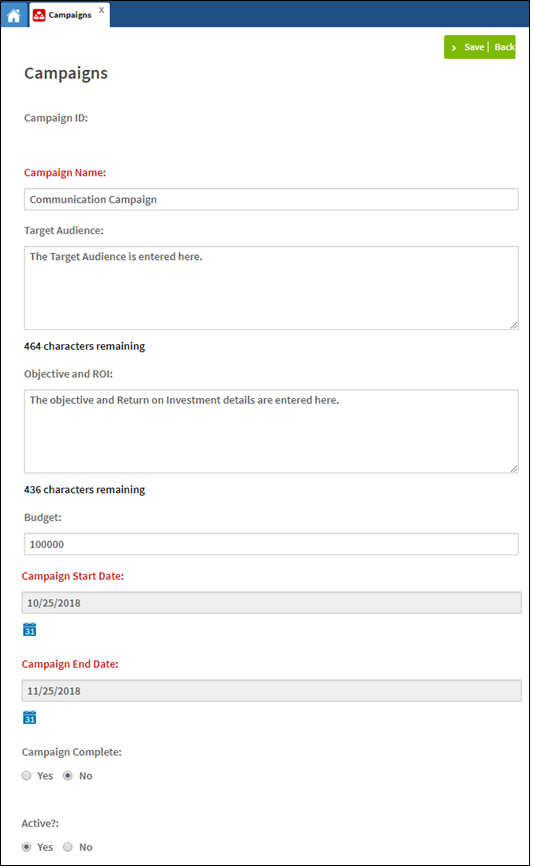
- Enter the campaign information.
Label
Description
Campaign Name
Enter a descriptive campaign name
Target Audience
Define the target audience the campaign is aimed at
Objective and ROI
Enter the objective you wish to achieve and the estimated Return on Investment (ROI)
Budget
Enter the amount budgeted for the campaign
Campaign Start Date
Use the calendar control to select a start date
Campaign End Date
Use the calendar control to select an end date
Campaign Complete
Select Yes if a campaign has come to an end
Active?
Select whether the campaign is active
- Click Save.
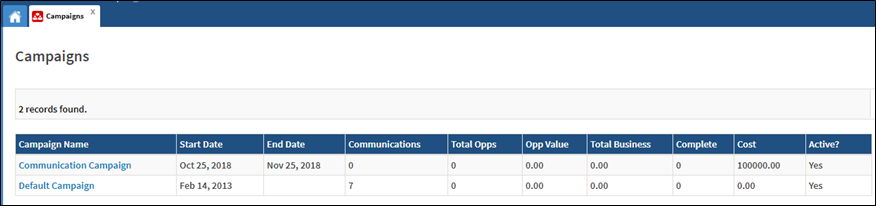
- The campaign is created and available for selection within the system.
Comments
0 comments
Please sign in to leave a comment.