
Overview
In addition to visibility settings that control who can access published content, Zift PRM provides several publication states that you can apply to each individual Page in your CMS (Content Management System).
The Page Status is set using the Specify Status drop-down list that is available in the Content Manager. The purpose of the status is to facilitate shepherding content through your organization's content lifecycle.
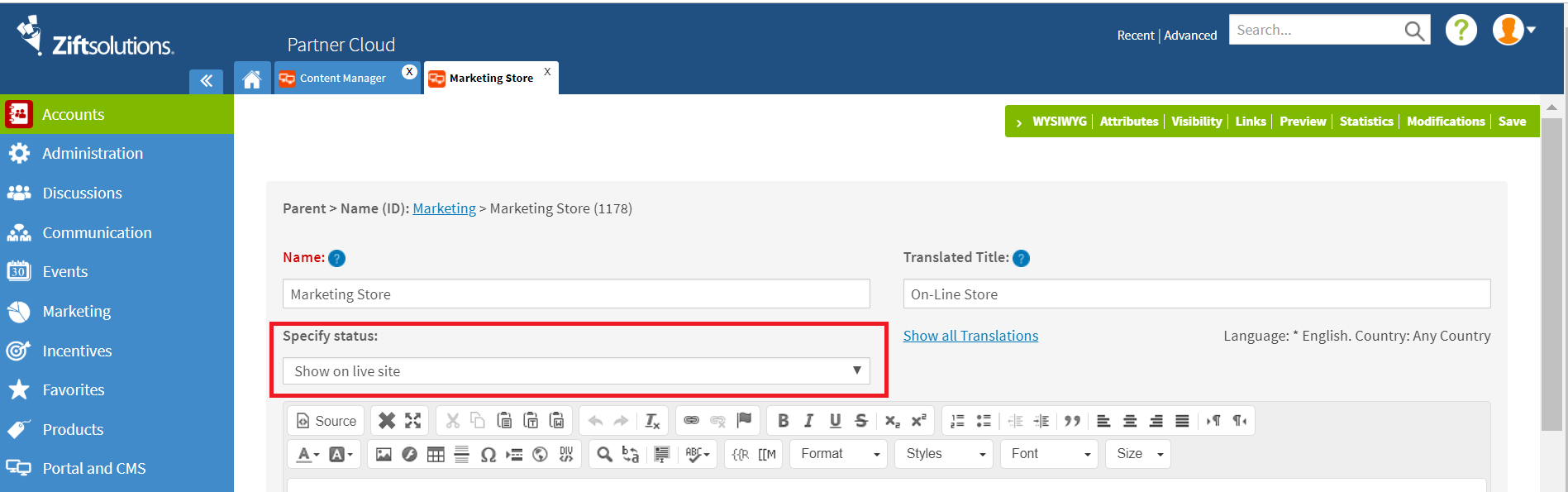
Every new Page that you create will start with the status set to Draft. This ensures that you do not inadvertently make content visible to users before it is ready. You must manually change this setting to make it available.
The status is visible within the Site Tree listing. The image below shows how each page would be displayed if it was set to the referenced status.
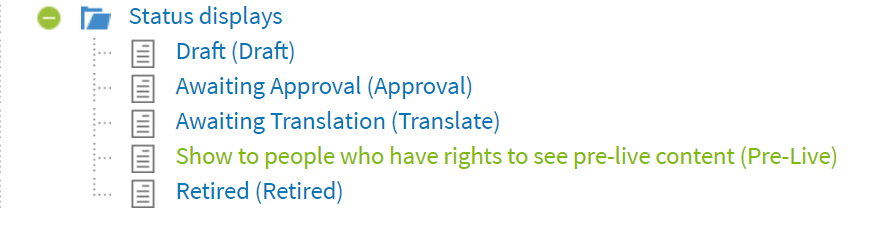
Note: You may need to hover over a Page name to reveal the status if the title is too long. The Archive status is not shown because Archived items are only visible in the separate Archive section of the Site Tree.
| Status | Purpose |
| Draft | Initial state of all pages in the CMS. Any Page set to Draft, and all of its child Pages, will not be visible on the Partner Portal. |
| Awaiting Approval | Use this status to identify pages that need to be reviewed before being published. |
| Awaiting Translation | Use this status for pages that require translations before they can be published. This is useful for countries where there is more than one official language and there may be legal requirements to provide content in all official languages on request. |
| Show to people who have rights to see pre-live content | This status will allow users in the Content Manager User Group to view the Page as if it was published. |
| Show on live site | This status is the only one that will display the content to users using only the restrictions |
| Retired | The retired status is used to designate content that is no longer published. This status is also an intermediate status that you must transition Pages to before they can be deleted. Pages in this state can be restored if needed. Retired pages remain in-situ in the Site Tree but identified as retired. |
| Archive | This status is used to identify pages that are no longer required. It is a useful alternative to deletion as the page. Archiving allows you to retrieve or view content while removing |
Comments
0 comments
Please sign in to leave a comment.