
Overview
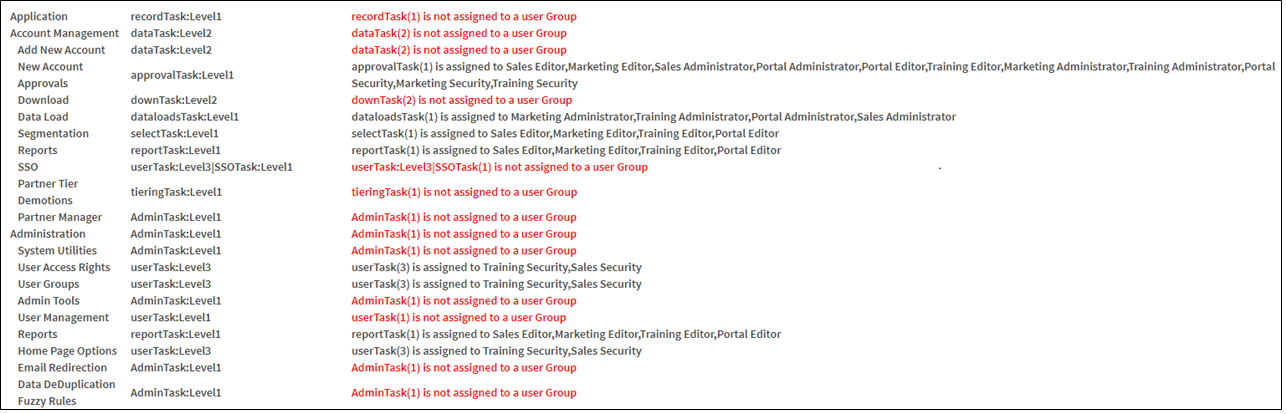
This report provides displays a list of product areas and the associated security rights that are required to access them. A third column lists which groups have been granted the right at the required level. Any security Task that has not been granted to any group is listed in red.
Before You Begin
Log into PRM Admin with with reportTask Level 1 rights or greater, userTask Level 3 rights or greater and adminTask Level 1 rights or greater.
How to View Unassigned Security Task
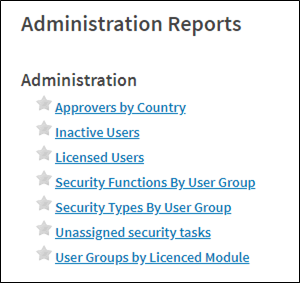
- Navigate to Administration > Reports.
- Select Unassigned Security Task from the report list.
- A list of unassigned security tasks is displayed.
Comments
0 comments
Please sign in to leave a comment.