
Overview
Each Target List is a snapshot of the users in the database at the time the Target List was generated. The list is generated when it is first created, and again each time that it is manually or automatically refreshed.
You can specify whether to refresh a list on a schedule or ad-hoc basis when the list is created. You can also lock a list so that it will not be updated by selecting the Never. In either case, the update is performed automatically based on the list's selection criteria which is best practice.
Which option you choose for refreshing will depend on the purpose of the list. For example, it may be sufficient to refresh a list on a monthly basis if it is used to automatically send out a newsletter. In this case, the chance of misdirecting an email to an inactive user or missing a new user may be less than the effort of performing a manual list refresh. In other cases, the list may be only intermittently used but must be up-to-date. As a matter of best practice, it is usually desirable to set a moderately regular scheduled update but to force a refresh immediately before using the a list.
This approach is the best practice to updating Target Lists.
Before You Begin
Log into PRM Admin with CommTask Level 1 rights or greater.
How to Refresh a Target List
- Navigate to Communication > Target Lists.
- The available lists are displayed.
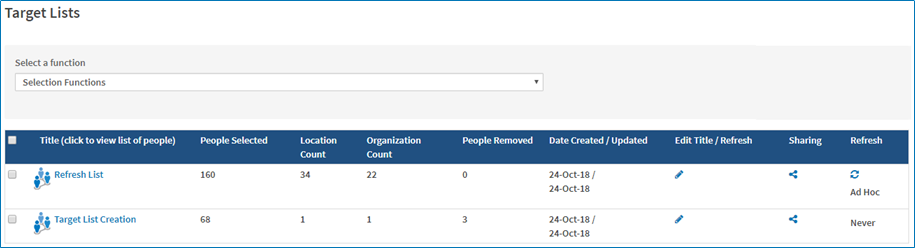
- Click the icon in the Refresh column to update the list manually.
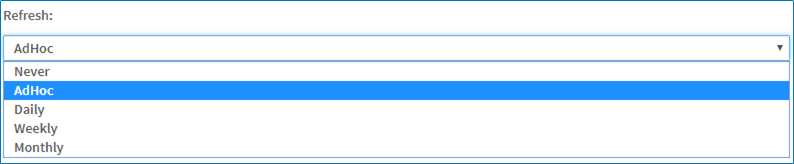
- To set a schedule for the Refresh,click the pencil icon in the Edit Title/Refresh column. Select
- Never
- Allow Refresh AdHoc/Manual in the dropdown list.
- Daily
- Weekly
- Monthly
- Click Save.
Comments
0 comments
Please sign in to leave a comment.