
Overview
Zift PRM Training provides all the tools needed to create and deliver a comprehensive training program to internal staff, partners, and the public. Zift Training software can support either virtual or classroom training and allows both directed and on-demand training.
Courses and Modules may be grouped together as Training Programs. This is for the convenience of the training administrator within Zift PRM, allowing them to filter the configuration rules shown on each screen. It does not affect display of Courses and Modules on the Portal.
Training Programs can be useful in situations where you have multiple trainers.
Before You Begin
Log into PRM Admin with eLearningTask Level 2 rights.
How to Create Training Programs
- Navigate to Training > Training Programs.
- Click Add.
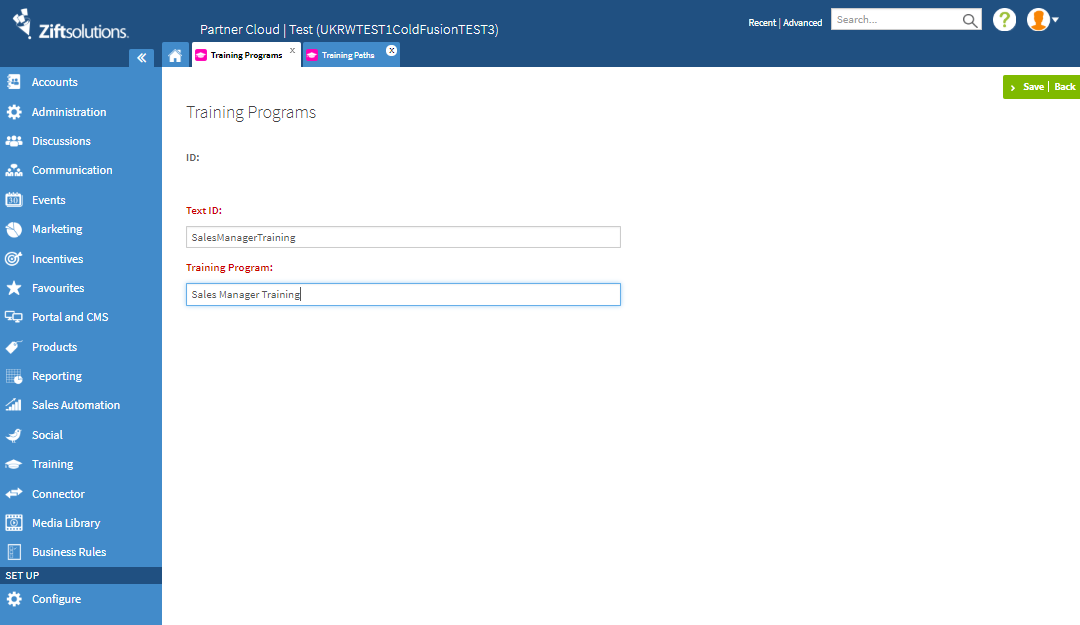
- In the Training Programs screen, provide the following information:
- Text ID: This is a unique code to identify this Training Program. Do not use spaces.
- Training Program: This is a user-friendly name for this Training Program.
- Language: Select the language that the article is written in.
- Click Save.
Related Topics
- Video: Introduction to Training
- Video: Training in the Portal Overview
- Video: Reports and RelayTags
- Video: Training Programs and Paths
- Video: Training Modules and Module Sets
- Video: Create Quizzes for Training Courses
- About Training
- Administration: Reports
- Training RelayTags
- Training: Create Quizzes
Comments
0 comments
Please sign in to leave a comment.